Where is my Wi-Fi stronger?
Follow your router and mesh nodes, compare nearby signals, and make informed placement decisions.
Explore mesh & coverageYOUR HOME. YOUR NETWORK. IN FOCUS.
Find the weak spots in your Wi-Fi. Understand your Internet connection. Turn your Windows laptop or tablet into a portable network inspection station—and keep useful wired-network tools at your desk.
Try it free for two days. $4.99 lifetime.
One computer. No subscription.
 Wi-Fi + Ethernet / Windows 10 & 11
 Explore the actual application
MAKE SENSE OF THE CONNECTION
The room where you work, the sofa where you stream, the upstairs corner that never quite connects. See how your Wi-Fi signal changes in the places that matter.
Choose your own router and mesh points, carry a compatible Windows laptop or tablet around your home, and compare the readings. Then use Internet health checks, live traffic monitoring, and local-network tools to look beyond the Wi-Fi bars.
Compatibility notice: Ultra-wide monitors are not currently supported. Use a standard 16:9 display at 1080p, 1440p, or 4K, or a compatible Windows laptop or tablet.
Explore your home Wi-FiONE TOOLKIT. EVERYDAY ANSWERS.
Start with the question you want to answer. Wi-Fi Commander brings 15 focused functions into one application, with dedicated screens for your most useful readings.
Follow your router and mesh nodes, compare nearby signals, and make informed placement decisions.
Explore mesh & coverageCheck Internet response, connection consistency, download performance, and current network traffic.
See connection toolsReview visible LAN devices, inspect local ports, and open the network test you need from one menu.
Look inside your networkLIVE WI-FI RANGE FINDER
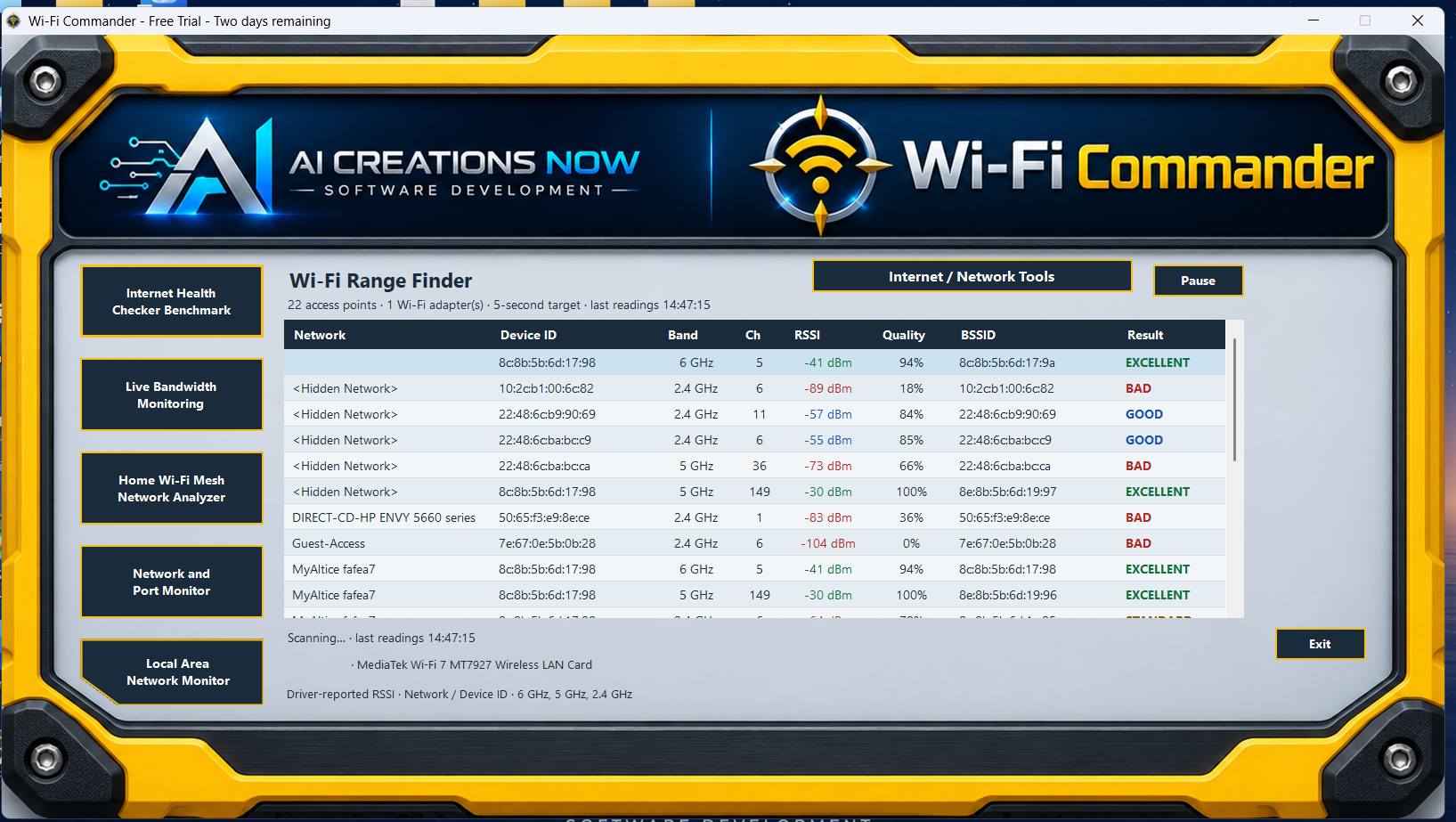
The main yellow dashboard keeps nearby Wi-Fi networks in view. Compare names, bands, channels, and signal ratings as you move, then open the rest of your toolkit from the same screen.
See all 17 actual screenshots
The live table shows nearby access points with signal strength in dBm, signal quality, an easy-to-read rating, and the radio identifiers and device groups reported by Windows. Pause the readings when you want a closer look. The screen’s buttons open Internet Health, Bandwidth, Mesh, Ports, LAN, and Network / Internet Tools.
Range Finder measures signal strength, not distance in feet or meters. An enabled compatible Wi-Fi adapter is required; Ethernet alone cannot scan nearby Wi-Fi.Product preview
The preview starts muted automatically where your browser permits autoplay. Use the controls for sound, pause, or full screen.
TWO DAYS TO EXPLORE YOUR CONNECTION
Start in the room where you use Wi-Fi most. Choose your equipment, compare the signal, and see what your connection can tell you.